Medical Chronology Software for Law Firms
Turn disorganized medical records into hearing-ready, settlement-ready, and case-ready timelines with citations your team can trust.
Chronology work is one of the highest-friction steps in case preparation. A single matter can include thousands of pages from hospitals, specialists, imaging centers, and prior treating providers. Even strong teams lose hours simply locating the right date, provider, and diagnosis.
File Logic is built for firms that handle heavy medical record review. Instead of manually building a chronology from scratch, your team uploads the file, lets the platform read every page, and reviews a structured timeline that already pulls out dates, diagnoses, treatment events, restrictions, and supporting citations.
The result is a chronology workflow that scales. Your staff spends less time retyping records into spreadsheets and more time spotting strategy, confirming key facts, and moving cases forward faster.
A chronology workflow built around legal review, not generic summarization
Most AI summarizers give you a paragraph and leave the real work to your legal team. Chronology software for law firms has to do more than summarize. It has to preserve order, separate provider events, surface medical significance, and let attorneys verify what the system found.
File Logic keeps the chronology grounded in the source file. Every extracted event can be reviewed against the page citation, which means the platform helps your team move faster without asking them to trust an opaque summary. That distinction matters when the chronology is going into a demand package, hearing prep, mediation packet, or internal case strategy memo.
Chronological ordering across large multi-provider files
Citations that point back to the source page
Exportable timelines for attorney review and client deliverables
Search and question-answering on top of the same chronology data
The real cost of manual chronology work
Firms do not lose cases because they lack records. They lose time, margin, and leverage because the important facts stay buried too long.
10-40 hours
Manual review drains case capacity
Chronologies often consume a full workweek of staff time before an attorney can even start reviewing the actual case story. That slows intake, delays case strategy, and limits how many matters a firm can actively move at once.
Page 800+
Important medical events stay hidden
The note that explains a treatment gap or the diagnosis that changes value is usually not on page one. It is buried deep in the file, and human review gets less reliable as fatigue builds over hundreds of pages.
Repeated rework
Teams rebuild the same timeline twice
A paralegal builds the first chronology, then an attorney rewrites it for hearing prep, then someone else re-exports it for a demand or report. The same facts get repackaged repeatedly because the original chronology was never easy to trust or reuse.
How File Logic handles chronology creation
Upload the complete record set
Bring in PDFs, scans, and mixed medical records from one provider or many. File Logic runs OCR where needed, normalizes the file, and prepares the record for timeline extraction without requiring a separate cleanup pass first.
Review the generated chronology with citations
The system groups medical events into a timeline your team can scan quickly. Dates, providers, diagnoses, restrictions, and treatment events stay linked to the underlying page so attorneys can validate key details before using them externally.
Export or continue the analysis
Once the timeline is in place, your team can export it, ask follow-up questions, and use the chronology as the backbone for summaries, reports, hearing preparation, or settlement analysis.
A chronology that is useful the first time your team opens it
The chronology view is designed to reduce the amount of cleanup work between upload and legal use. Instead of a generic output blob, File Logic structures the record into reviewable events, making it easier to spot turning points, treatment gaps, duplicate records, and the chronology segments that matter most for case value.
Because the chronology sits alongside the source file, attorneys and staff can move directly from timeline review into case analysis. The same page citations that support the chronology also support later questions, summaries, and exports.
Timeline events tied to source pages
Fast review across long medical records
Export support for downstream legal work
Shared record foundation for search, summaries, and reports
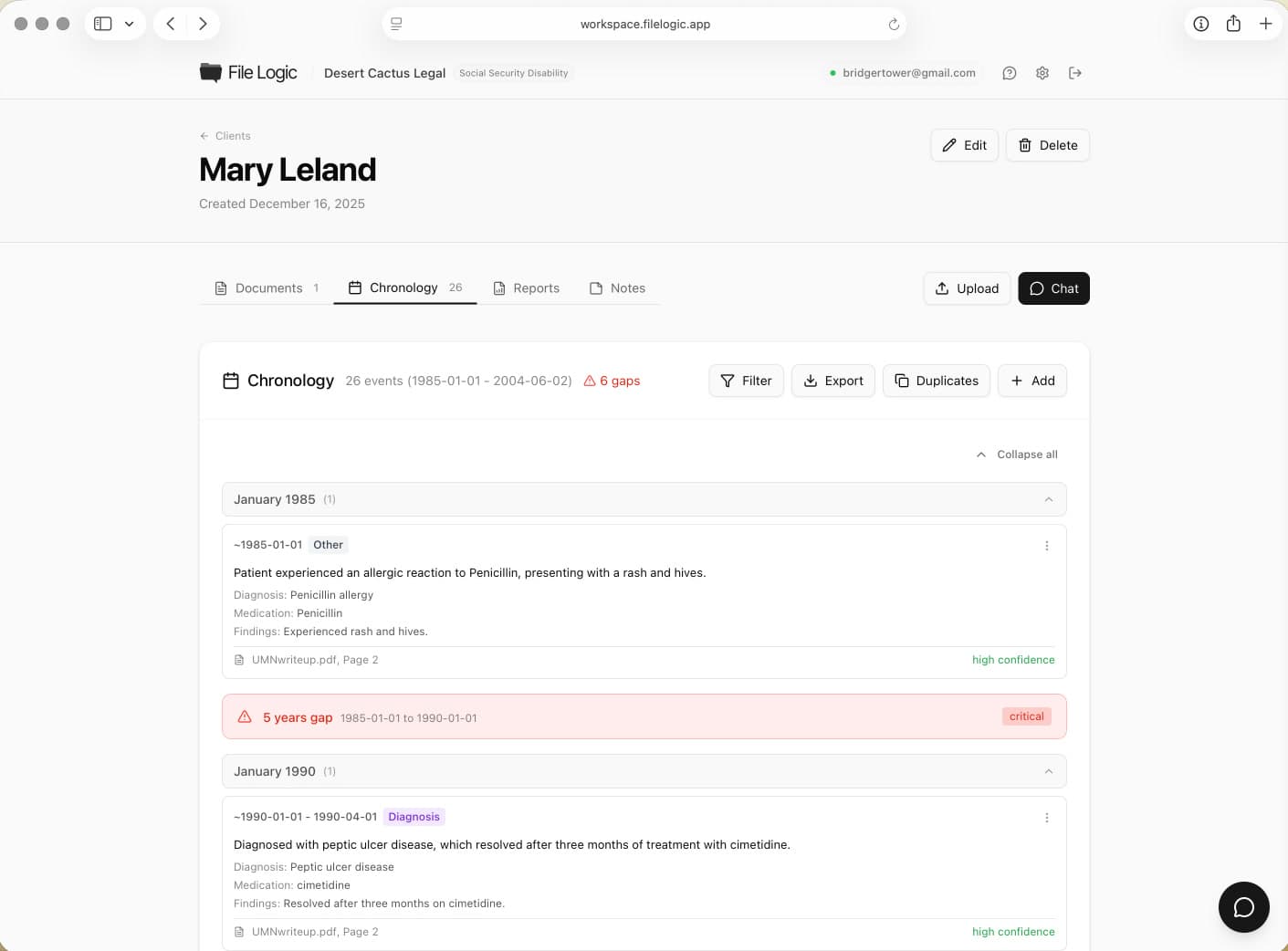
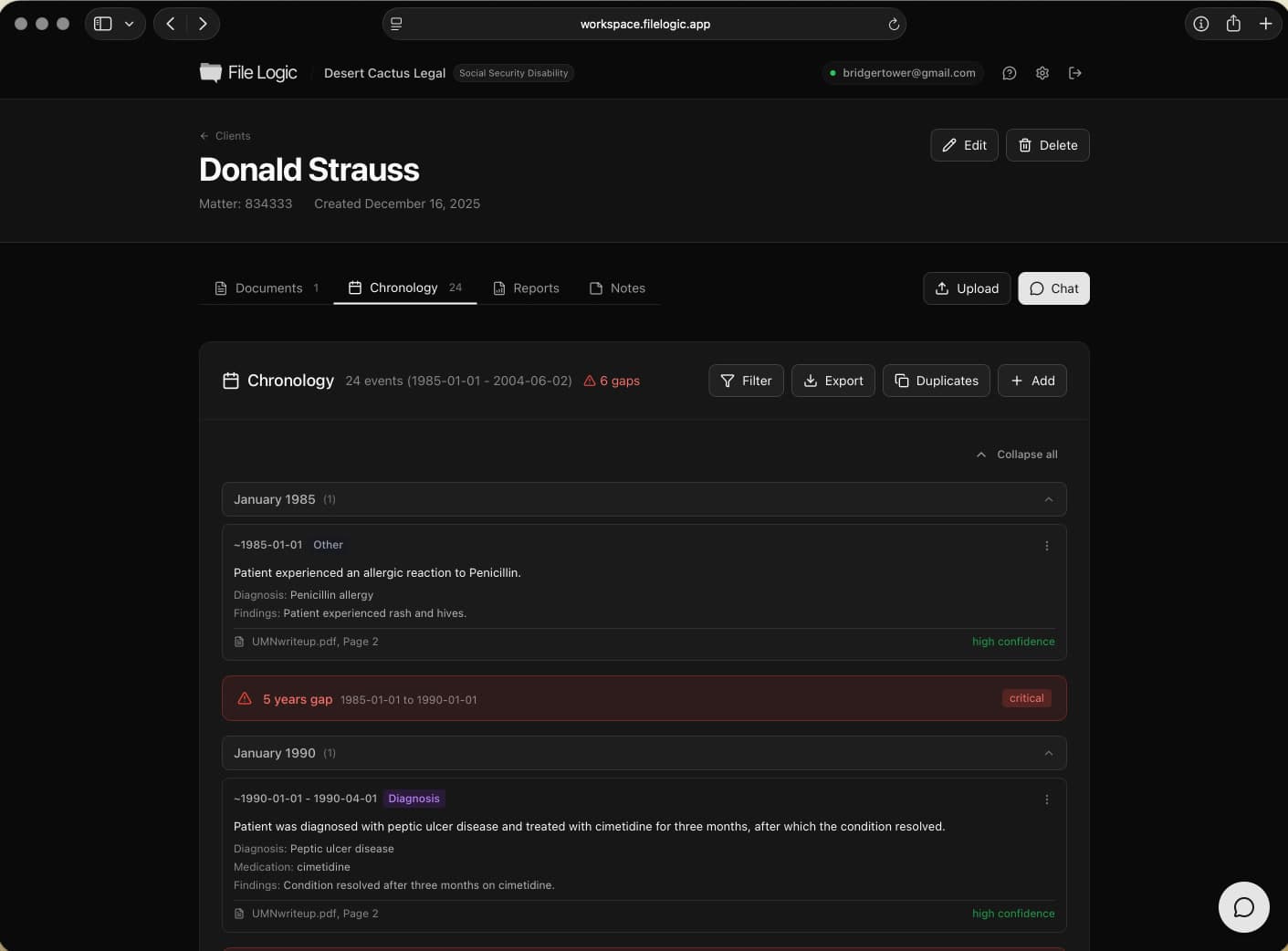
The chronology view turns long record sets into a reviewable timeline without dropping the underlying page references.
Built for firms handling sensitive records
Chronology work frequently involves protected health information, large client files, and teams that need to collaborate without losing control of the record. File Logic is designed for that environment, with organization isolation, encrypted storage, and a security posture built for legal teams working with medical data.
That matters for SEO too because high-intent buyers in this category do not convert on speed alone. They also need confidence that the product can support compliance conversations with firm leadership, IT, or clients.
HIPAA-ready infrastructure
Encrypted storage and transfer
Organization-level data isolation
BAA available for qualified firms
See where this workflow fits
File Logic supports multiple record-heavy practices. Explore the pages below for case-specific language and workflows.
Questions before you book a demo?
See how medical chronology software fits your case workflow
Book a demo and we will walk through how File Logic turns long record sets into cited timelines your team can actually use.