Legal Document Analysis Software with Citations
Ask case-specific questions, validate the answers, and move from raw documents to usable legal insight without losing the record context.
Document analysis is where teams either gain leverage or lose time. The case file usually contains the answer, but only after someone pieces together the relevant providers, dates, restrictions, opinions, and supporting pages.
File Logic gives legal teams a way to interrogate the record directly. Users can ask targeted questions against uploaded documents and get answers tied to citations, which shortens the path from raw file to case insight.
That makes the platform especially useful for high-volume practices where attorneys need to evaluate treatment history, causation, restrictions, costs, or service connection quickly while still trusting the evidence behind the answer.
Analysis that starts with the source record
The value of legal document analysis is not only faster answers. It is faster answers that remain usable under attorney review. File Logic keeps analysis attached to the uploaded documents so users can inspect the same citations and chronology context that support the output.
That design makes the platform fit real legal workflows better than systems that return unsupported summaries or require users to trust an answer without a clear path back to the file.
Question-answering grounded in uploaded documents
Answers supported by citations
Shared context with chronology and summaries
Faster legal review across long files
Why document analysis is slow in record-heavy cases
Case teams do not need more PDFs. They need a faster way to get to the facts that drive litigation and claims outcomes.
Dense files
Important answers are spread across many pages
A file may contain the diagnosis, the causation note, the restriction, and the cost detail, but each sits in a different document or provider section. The time cost comes from stitching them together manually.
Low-confidence AI
Unsupported answers create more work
When an AI tool cannot show the user where it found the answer, attorneys still have to reopen the record and verify it manually. Unsupported output often creates a second research task instead of removing one.
Missed opportunities
Slow analysis delays case decisions
Attorneys need timely answers to questions about treatment, restrictions, nexus, or damages. When analysis arrives late, the firm loses speed on demands, hearings, negotiations, and case triage.
How File Logic supports legal document analysis
Load the matter file into one workspace
The uploaded record becomes the shared source for chronology, summaries, and question-answering so the case team works from one consistent document foundation.
Ask specific legal and medical record questions
Users can ask targeted questions about restrictions, provider opinions, treatment progression, costs, gaps, or other case issues. The platform answers from the uploaded file rather than relying on generic external data.
Validate and act on the result
Because the answer includes citations, the attorney can move quickly from analysis to action, whether that means updating a chronology, drafting a report, preparing a hearing issue, or evaluating settlement posture.
Answers that point back to the file
The analysis surface is designed for practical legal use. Teams can ask document questions in plain language and still inspect the underlying support. That keeps the workflow fast while preserving the discipline attorneys need before using the answer in a real matter.
This same document analysis layer becomes more valuable over time because it sits on top of the chronology, summaries, and searchable file. Each part of the workflow strengthens the others instead of living in isolation.
Citation-backed answers from uploaded files
Analysis tied to chronology and summaries
Faster access to case-driving facts
Practical support for hearing, demand, and review work
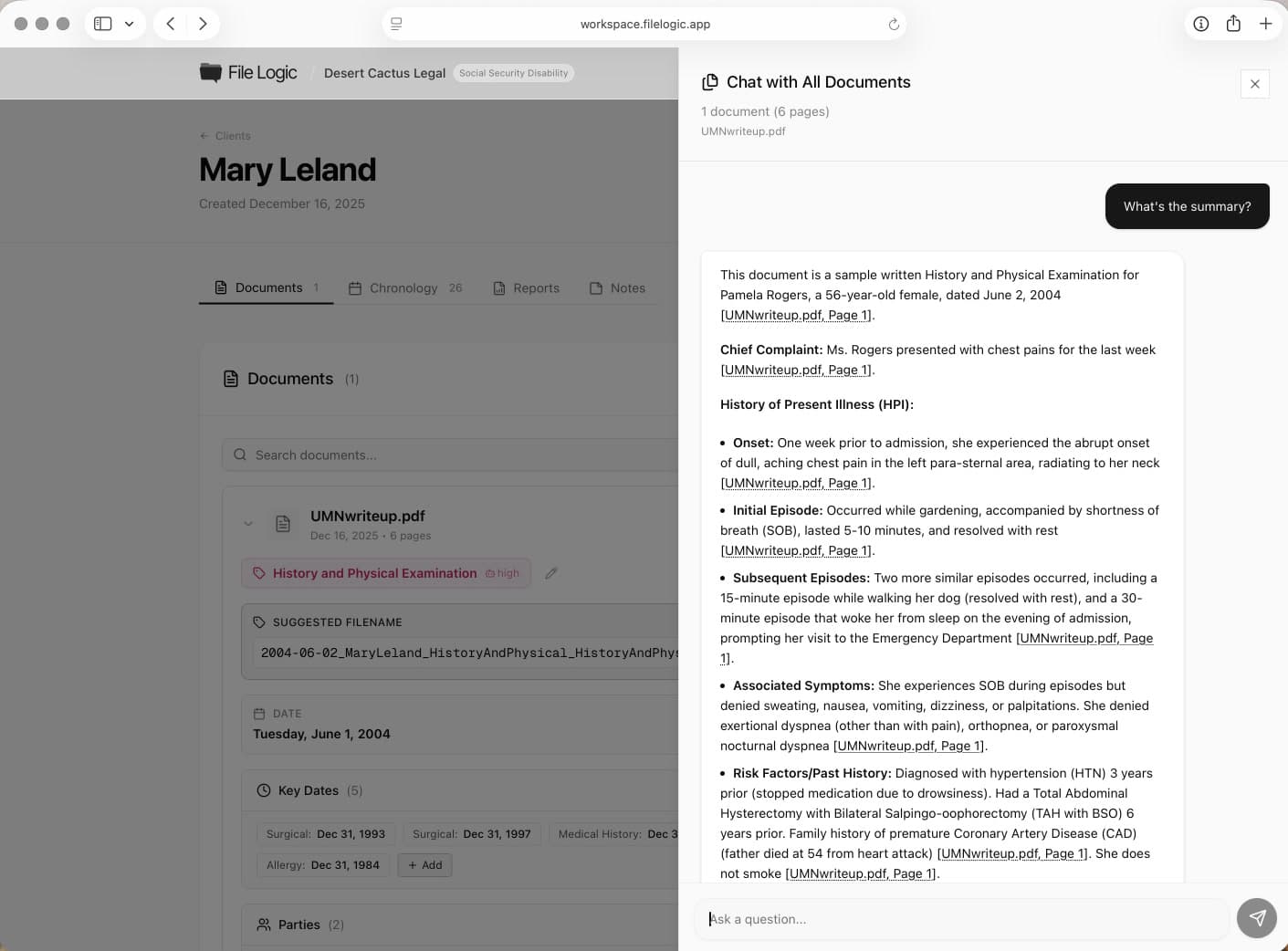
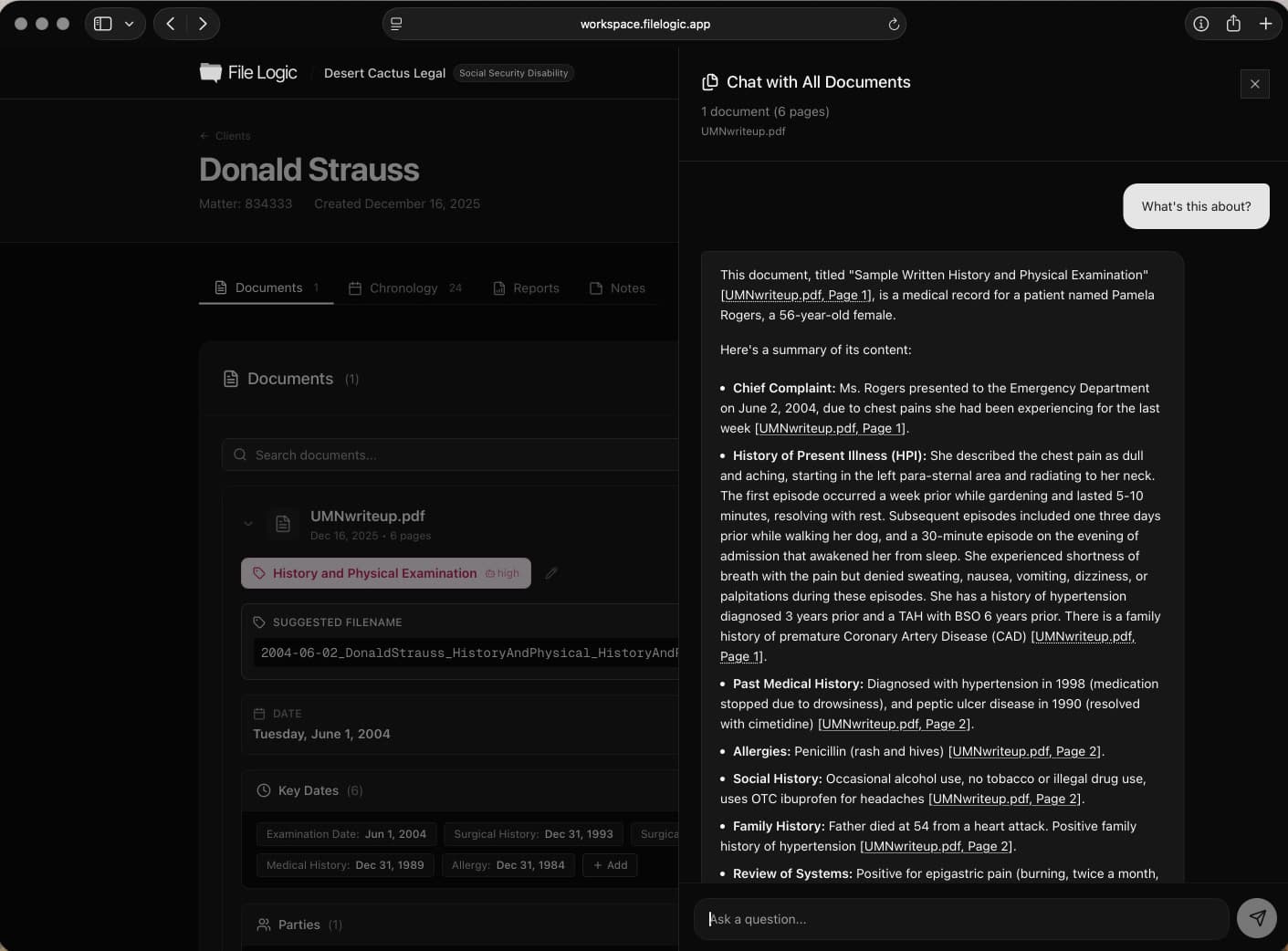
The analysis workflow helps teams ask direct questions and still validate the answer against the source record.
Document analysis that fits real firm requirements
High-intent buyers in legal AI care about more than output quality. They also need to know the platform handles sensitive client material responsibly. File Logic is designed so firms can evaluate the product as a real operational tool, not an isolated AI experiment.
That trust layer matters when the platform will be used on active matters that involve medical records, claims files, or other sensitive case materials.
Secure analysis on uploaded client records
No need to move files into ad hoc tools
Protected storage and organization controls
Compliance-aware platform foundation
See where this workflow fits
File Logic supports multiple record-heavy practices. Explore the pages below for case-specific language and workflows.
Questions before you book a demo?
Ask better questions of your case files
See how File Logic helps attorneys and staff move from raw records to cited case analysis without losing the source context.